
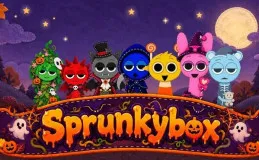
Sprunkybox
Sprunkybox is a Halloween music game for browsers: assemble 7 felt characters on stage, mix beats, bass, melody and effects, hunt for 19 hidden songs, enable Dark Mode and record into the Music Book.


















20 felt characters. 7 stage tiles. 19 hidden songs. Sprunkybox doesn't reward random button presses. It rewards those who know how to arrange the formation.
You drag a character from the tray onto the stage. It immediately jumps and plays its own loop. Combine seven characters, and you have a complete mix. But that's the easiest part.
Open the game and assemble your first team.
Sprunkybox: Forming the Team
Each character has a fixed role: drums, bass, melody, vocals, or effects. Don't cram seven characters of the same type onto the stage. You need a stable rhythm base first, then add the melody on top.
Choosing Characters by Layer
The first thing is to build the rhythm. Choose a character to hold the beat, and let it run a few loops. Then add the bass. Finally, add the melody and vocals. This order keeps the mix from getting messy.
Reading the Badge
When the badge above the character's head lights up, you're matching the correct combo. Don't change the formation at that time. Let the badge roll completely. If the badge remains stationary, switch characters and listen again.
Hidden Song Hunt
19 hidden songs are divided into duets, trios, and quartets. You don't need to randomly try each combination. Listen for faint echoes and glimpses of shadows at the edge of the stage. That's a hint.
Fill seven boxes with the correct combo to unlock a legendary song. Use the Solo button to separate each layer and clearly hear which character is off-key. The Mute button lets you try a new layer without ruining the old mix.
Dark Mode is a reward, not a cosmetic option. Drop the black character onto the stage, lightning erupts, and their eyes glow red. All 20 characters switch to a new sound signature. Hidden songs in this mode are on a separate page in the Music Book.
Controls
- Mouse: Drag and drop characters, select Mute, Solo, or Remove.
- Space: Restart the mix.
- F: Turn on full screen.
- Esc: Close the open mix.
Are you ready to assemble all seven characters and flip through all 19 pages of music? Open Sprunkybox and try it now.